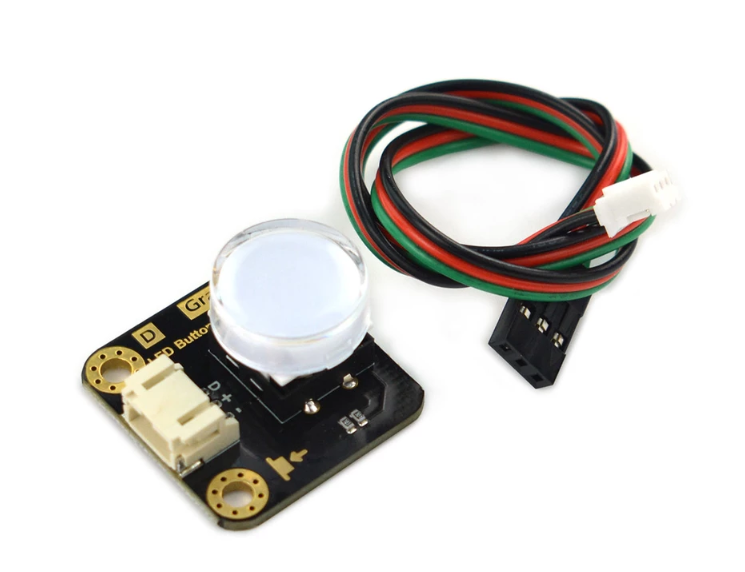
DFRobot Gravity LED Button - Red (DFR0785-R) - Illuminated Push Button Module with Transparent Cap, 3-Pin Gravity Connector for Arduino & micro:bit
plus AED 20 delivery · free over AED 100
- UAE-wide delivery, 1–2 working days · AED 20 · free on orders AED 100+
- Ships today — order by 3pm
- 7-day returns on unopened items
- SKU
- DIY-428
- Category
- Arduino and Raspberry Accessories & Modules
- Brand / MPN
- DFRobot DFR0785-R
- Min. order
- 1 pc
- Barcode
- DKU-000488
The Gravity LED Button is a compact, illuminated push-button module for interactive electronics, prototyping and classroom projects. A transparent cap shows a red indicator LED that lights while the button is pressed, giving instant visual feedback. It connects with a PH2.0 Gravity connector and works with Arduino and micro:bit.
Read the full description ↓Description
The Gravity LED Button is a compact, illuminated push-button module for interactive electronics, prototyping and classroom projects. A transparent cap shows a red indicator LED that lights while the button is pressed, giving instant visual feedback. It connects with a PH2.0 Gravity connector and works with Arduino and micro:bit.
When pressed down, the module outputs HIGH and the LED lights up. When released, the output goes LOW and the LED turns off.
Features
- Integrated LED lights up automatically when the button is pressed
- Digital signal output for simple microcontroller input detection
- Transparent button cap for clear visual indication
- Gravity PH2.0 connector for quick plug-and-play wiring
- Multiple LED colour options: red, yellow, green, blue, white
Applications
- Interactive electronics projects
- STEM education experiments
- Robotics control interfaces
- DIY control panels
- Game input buttons
- Human–machine interface prototypes
Specifications
| Specification | Value |
|---|---|
| Part number | DFRobot DFR0785-R |
| LED colour | Red |
| Operating voltage | 3.3–5 V (3.3 V recommended) |
| Output | Digital (HIGH when pressed, LOW when released) |
| Connector | PH2.0-3P |
| Dimensions | 27 × 26.5 mm (1.06 × 1.04 in) |
| Available colours | Red, yellow, green, blue, white |
Pinout
| Pin | Label | Description |
|---|---|---|
| 1 | D | Signal (digital output) |
| 2 | + | VCC 3.3–5 V |
| 3 | - | GND |
Connection diagram
_0x0.png.webp)
Getting started (Arduino)
- Connect D to digital pin 2, + to 3.3 V (or 5 V) and - to GND using the included cable
- In setup(), use pinMode(2, INPUT); in loop(), digitalRead(2) returns HIGH while the button is pressed
- Open the Serial Monitor and press the button - the reading changes and the cap lights up
On micro:bit, use the MakeCode "digital read pin" block or DFRobot’s Mind+ software.
Shipping list
- Gravity: LED Button - Red × 1
- Digital Sensor Connector (cable) × 1
Specifications
No reviews yet · be the first
Sign in to review a product you have bought - or use the review link in your order email, which needs no account and marks your review as a verified purchase.
Related components
 Backorder
%22%2F%3E%3Cellipse%20cx%3D%2228%22%20cy%3D%2224%22%20rx%3D%2226%22%20ry%3D%2214%22%20fill%3D%22rgba(255%2C255%2C255%2C.18)%22%2F%3E%3Crect%20x%3D%2222%22%20y%3D%2228%22%20width%3D%2256%22%20height%3D%2250%22%20rx%3D%2212%22%20fill%3D%22url(%23b)%22%20filter%3D%22url(%23s)%22%2F%3E%3Cellipse%20cx%3D%2234%22%20cy%3D%2236%22%20rx%3D%2212%22%20ry%3D%226%22%20fill%3D%22rgba(255%2C255%2C255%2C.28)%22%20transform%3D%22rotate(-18%2034%2036)%22%2F%3E%3Crect%20x%3D%2234%22%20y%3D%2215%22%20width%3D%225%22%20height%3D%2214%22%20rx%3D%222.5%22%20fill%3D%22%236ee7b7%22%2F%3E%3Crect%20x%3D%2261%22%20y%3D%2215%22%20width%3D%225%22%20height%3D%2214%22%20rx%3D%222.5%22%20fill%3D%22%236ee7b7%22%2F%3E%3Ccircle%20cx%3D%2236.5%22%20cy%3D%2214%22%20r%3D%224%22%20fill%3D%22%23a7f3d0%22%2F%3E%3Ccircle%20cx%3D%2263.5%22%20cy%3D%2214%22%20r%3D%224%22%20fill%3D%22%23a7f3d0%22%2F%3E%3Crect%20x%3D%2228%22%20y%3D%2242%22%20width%3D%2244%22%20height%3D%2222%22%20rx%3D%226%22%20fill%3D%22%23022c22%22%2F%3E%3Cline%20x1%3D%2228%22%20y1%3D%2250%22%20x2%3D%2272%22%20y2%3D%2250%22%20stroke%3D%22%2334d399%22%20stroke-width%3D%22.8%22%20stroke-opacity%3D%22.5%22%2F%3E%3Cline%20x1%3D%2228%22%20y1%3D%2257%22%20x2%3D%2272%22%20y2%3D%2257%22%20stroke%3D%22%2334d399%22%20stroke-width%3D%22.8%22%20stroke-opacity%3D%22.5%22%2F%3E%3Cline%20x1%3D%2244%22%20y1%3D%2242%22%20x2%3D%2244%22%20y2%3D%2264%22%20stroke%3D%22%2334d399%22%20stroke-width%3D%22.8%22%20stroke-opacity%3D%22.5%22%2F%3E%3Cline%20x1%3D%2256%22%20y1%3D%2242%22%20x2%3D%2256%22%20y2%3D%2264%22%20stroke%3D%22%2334d399%22%20stroke-width%3D%22.8%22%20stroke-opacity%3D%22.5%22%2F%3E%3Ccircle%20cx%3D%2238%22%20cy%3D%2252%22%20r%3D%226%22%20fill%3D%22%2334d399%22%20opacity%3D%22.9%22%2F%3E%3Ccircle%20cx%3D%2262%22%20cy%3D%2252%22%20r%3D%226%22%20fill%3D%22%2334d399%22%20opacity%3D%22.9%22%2F%3E%3Ccircle%20cx%3D%2236.5%22%20cy%3D%2250.5%22%20r%3D%222%22%20fill%3D%22white%22%2F%3E%3Ccircle%20cx%3D%2260.5%22%20cy%3D%2250.5%22%20r%3D%222%22%20fill%3D%22white%22%2F%3E%3Cpath%20d%3D%22M36%2068%20Q50%2076%2064%2068%22%20fill%3D%22none%22%20stroke%3D%22%23022c22%22%20stroke-width%3D%222.5%22%20stroke-linecap%3D%22round%22%2F%3E%3C%2Fsvg%3E)