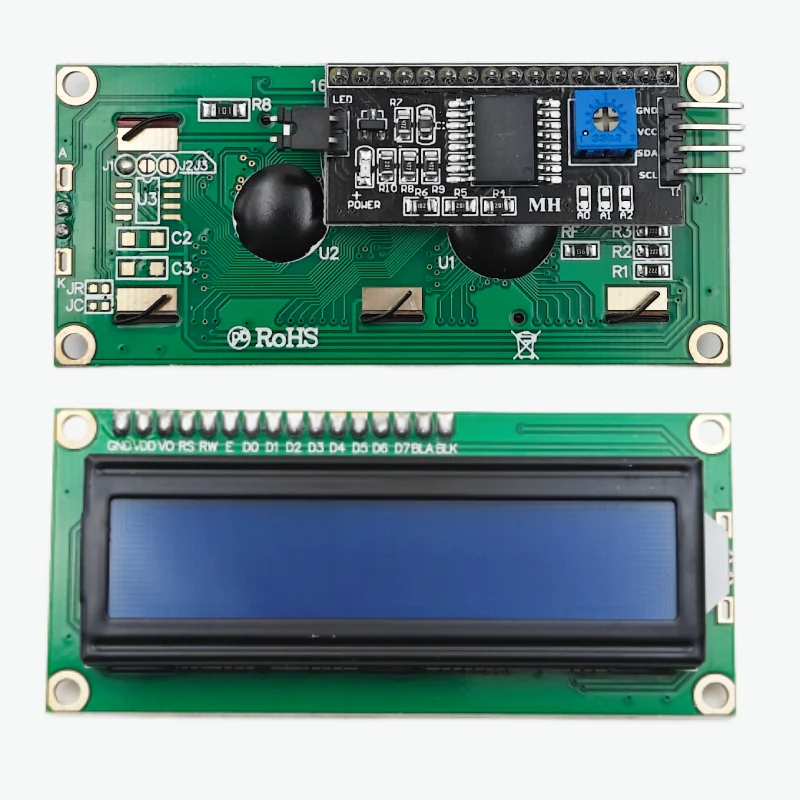
LCD 1602 I2C Display Module - 16x2 Character LCD with Pre-Soldered PCF8574 I2C Backpack, Blue Backlight, 5V for Arduino, ESP32 & Raspberry Pi
plus AED 20 delivery · free over AED 100
- UAE-wide delivery, 1–2 working days · AED 20 · free on orders AED 100+
- Ships today — order by 3pm
- 7-day returns on unopened items
- SKU
- DIY-415
- Category
- Displays
- Brand / MPN
- DIYKIT
- Min. order
- 1 pc
- Barcode
- DKU-000475
This is the classic 16x2 character LCD with the I2C backpack already soldered on. Instead of 16 pins and six or more wires, it connects with four: GND, VCC, SDA and SCL. Plug it into the I2C bus of an Arduino, ESP32 or Raspberry Pi and print text with the LiquidCrystal_I2C library.
Read the full description ↓Complete the build
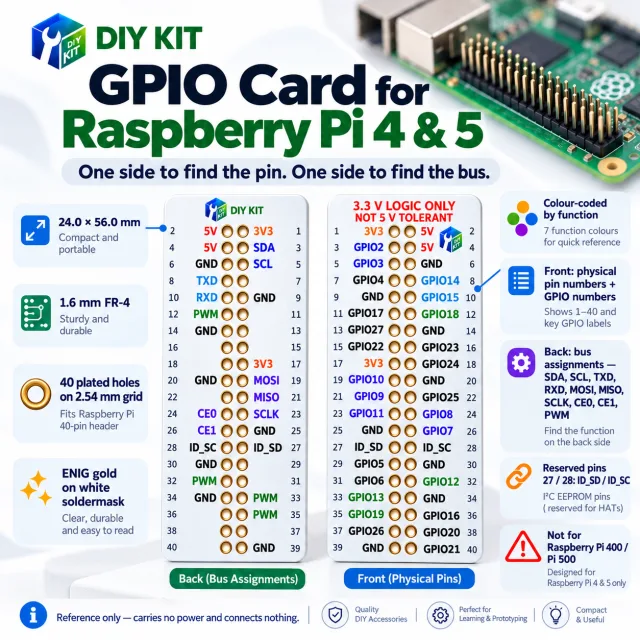
Our own DIYKIT board was made for this — plus what it is usually wired or ordered with.
Description
This is the classic 16x2 character LCD with the I2C backpack already soldered on. Instead of 16 pins and six or more wires, it connects with four: GND, VCC, SDA and SCL. Plug it into the I2C bus of an Arduino, ESP32 or Raspberry Pi and print text with the LiquidCrystal_I2C library.
The display is the HD44780-compatible 1602A with a blue backlight and white characters. The PCF8574 backpack carries the contrast potentiometer, a backlight jumper and the A0–A2 address pads, so several displays can share one bus.
What it does
- Shows sensor readings, menus, clocks and status messages in two lines of 16 characters
- Frees up GPIO pins – the whole display runs on the two I2C pins
- Drop-in replacement for the parallel LCD 1602 in any Arduino tutorial, with no soldering
- Shares the bus with other I2C devices (RTC, sensors, OLED) on the same two wires
Specifications
| Specification | Value |
|---|---|
| Display | 16 columns x 2 rows, 5x8 dot characters |
| LCD controller | HD44780 compatible (1602A) |
| I2C expander | PCF8574 backpack, soldered to the LCD |
| I2C address | 0x27 default (0x3F on PCF8574A boards); A0-A2 pads give 8 addresses |
| Supply voltage | 5 V |
| Current | About 20-25 mA with backlight on |
| Interface | I2C (SDA, SCL), 100 kHz standard mode |
| Pins | 4: GND, VCC, SDA, SCL |
| Backlight | Blue LED backlight, white characters, jumper to disable |
| Contrast | Potentiometer on the backpack |
| Module size | 80 x 36 mm, about 20 mm high with backpack |
| Viewing area | 64.5 x 16 mm |
| Operating temperature | 0 to 50 C |
| Weight | About 40 g |
Wiring
| Pin | Connect to | What it does |
|---|---|---|
| GND | GND | Ground |
| VCC | 5 V | Power for the LCD and backlight |
| SDA | Arduino UNO/Nano A4, Mega 20, ESP32 GPIO 21, ESP8266 D2, Raspberry Pi GPIO 2 | I2C data |
| SCL | Arduino UNO/Nano A5, Mega 21, ESP32 GPIO 22, ESP8266 D1, Raspberry Pi GPIO 3 | I2C clock |
The backpack’s pull-up resistors are tied to 5 V. On a 3.3 V board (ESP32, ESP8266, Raspberry Pi) use a bidirectional I2C level shifter to keep the SDA and SCL lines within the board’s limits.
Getting started (Arduino)
- Install the LiquidCrystal I2C library (Library Manager, by Frank de Brabander)
- Wire the four pins as in the table above
- Open File → Examples → LiquidCrystal I2C → HelloWorld, set the address to 0x27 (or 0x3F) and upload. If the screen stays blank, turn the contrast potentiometer slowly until the characters appear
- Still nothing? Run an I2C scanner sketch – some batches use address 0x3F instead of 0x27
Raspberry Pi
Enable I2C in raspi-config, connect through a level shifter, then i2cdetect -y 1 shows the display at 0x27. The RPLCD Python library drives it with a few lines of code.
Specifications
No reviews yet · be the first
Sign in to review a product you have bought - or use the review link in your order email, which needs no account and marks your review as a verified purchase.
Related components
%22%2F%3E%3Cellipse%20cx%3D%2228%22%20cy%3D%2224%22%20rx%3D%2226%22%20ry%3D%2214%22%20fill%3D%22rgba(255%2C255%2C255%2C.18)%22%2F%3E%3Crect%20x%3D%2222%22%20y%3D%2228%22%20width%3D%2256%22%20height%3D%2250%22%20rx%3D%2212%22%20fill%3D%22url(%23b)%22%20filter%3D%22url(%23s)%22%2F%3E%3Cellipse%20cx%3D%2234%22%20cy%3D%2236%22%20rx%3D%2212%22%20ry%3D%226%22%20fill%3D%22rgba(255%2C255%2C255%2C.28)%22%20transform%3D%22rotate(-18%2034%2036)%22%2F%3E%3Crect%20x%3D%2234%22%20y%3D%2215%22%20width%3D%225%22%20height%3D%2214%22%20rx%3D%222.5%22%20fill%3D%22%236ee7b7%22%2F%3E%3Crect%20x%3D%2261%22%20y%3D%2215%22%20width%3D%225%22%20height%3D%2214%22%20rx%3D%222.5%22%20fill%3D%22%236ee7b7%22%2F%3E%3Ccircle%20cx%3D%2236.5%22%20cy%3D%2214%22%20r%3D%224%22%20fill%3D%22%23a7f3d0%22%2F%3E%3Ccircle%20cx%3D%2263.5%22%20cy%3D%2214%22%20r%3D%224%22%20fill%3D%22%23a7f3d0%22%2F%3E%3Crect%20x%3D%2228%22%20y%3D%2242%22%20width%3D%2244%22%20height%3D%2222%22%20rx%3D%226%22%20fill%3D%22%23022c22%22%2F%3E%3Cline%20x1%3D%2228%22%20y1%3D%2250%22%20x2%3D%2272%22%20y2%3D%2250%22%20stroke%3D%22%2334d399%22%20stroke-width%3D%22.8%22%20stroke-opacity%3D%22.5%22%2F%3E%3Cline%20x1%3D%2228%22%20y1%3D%2257%22%20x2%3D%2272%22%20y2%3D%2257%22%20stroke%3D%22%2334d399%22%20stroke-width%3D%22.8%22%20stroke-opacity%3D%22.5%22%2F%3E%3Cline%20x1%3D%2244%22%20y1%3D%2242%22%20x2%3D%2244%22%20y2%3D%2264%22%20stroke%3D%22%2334d399%22%20stroke-width%3D%22.8%22%20stroke-opacity%3D%22.5%22%2F%3E%3Cline%20x1%3D%2256%22%20y1%3D%2242%22%20x2%3D%2256%22%20y2%3D%2264%22%20stroke%3D%22%2334d399%22%20stroke-width%3D%22.8%22%20stroke-opacity%3D%22.5%22%2F%3E%3Ccircle%20cx%3D%2238%22%20cy%3D%2252%22%20r%3D%226%22%20fill%3D%22%2334d399%22%20opacity%3D%22.9%22%2F%3E%3Ccircle%20cx%3D%2262%22%20cy%3D%2252%22%20r%3D%226%22%20fill%3D%22%2334d399%22%20opacity%3D%22.9%22%2F%3E%3Ccircle%20cx%3D%2236.5%22%20cy%3D%2250.5%22%20r%3D%222%22%20fill%3D%22white%22%2F%3E%3Ccircle%20cx%3D%2260.5%22%20cy%3D%2250.5%22%20r%3D%222%22%20fill%3D%22white%22%2F%3E%3Cpath%20d%3D%22M36%2068%20Q50%2076%2064%2068%22%20fill%3D%22none%22%20stroke%3D%22%23022c22%22%20stroke-width%3D%222.5%22%20stroke-linecap%3D%22round%22%2F%3E%3C%2Fsvg%3E)