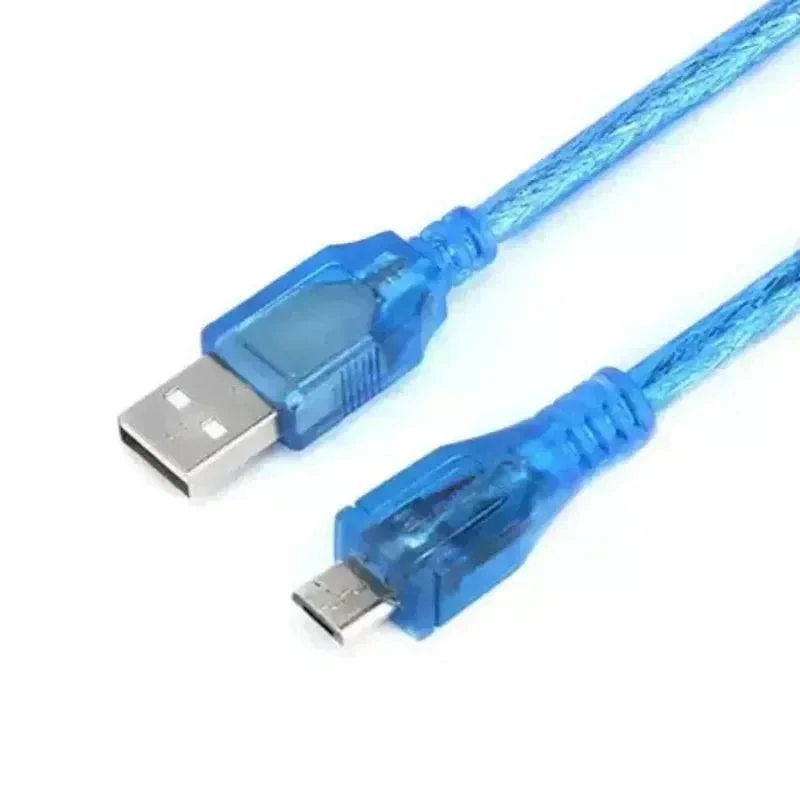
USB A to Micro USB Cable - Data and Power Cord, Fast Charging and High Speed Sync for Arduino, ESP32, and Raspberry Pi Starter Kits
plus AED 20 delivery · free over AED 100
- UAE-wide delivery, 1–2 working days · AED 20 · free on orders AED 100+
- Ships today — order by 3pm
- 7-day returns on unopened items
- SKU
- DIY-344
- Min. order
- 1 pc
- Barcode
- DKU-000389
Overview The USB A to Micro USB Cable is an essential accessory engineered specifically for electronics hobbyists, engineers, and students working with microcontroller development boards and starter kits.
Read the full description ↓Complete the build
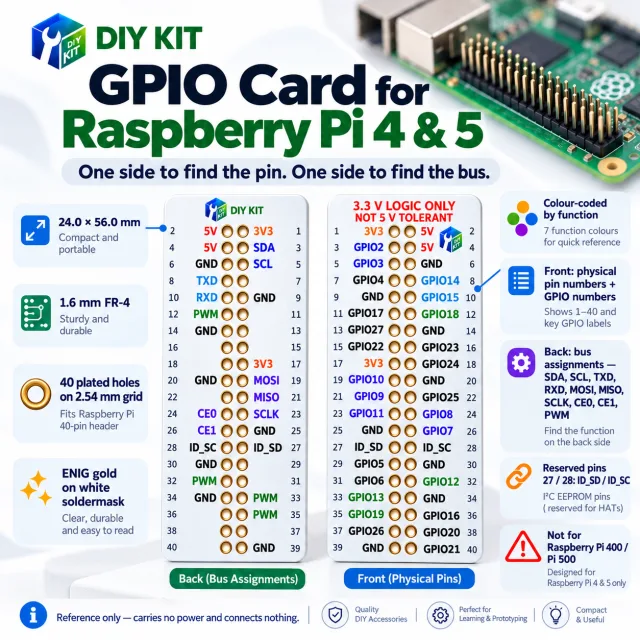
Our own DIYKIT board was made for this — plus what it is usually wired or ordered with.
1x USB A to Micro USB Cable
Description
Overview
The USB A to Micro USB Cable is an essential accessory engineered specifically for electronics hobbyists, engineers, and students working with microcontroller development boards and starter kits. Whether you are programming an Arduino Uno, uploading sketches to an ESP32 Wi-Fi module, or powering a Raspberry Pi Zero, this cable delivers stable power delivery and error-free data synchronization. Built to withstand the rigors of frequent plugging and unplugging on a workbench, it bridges the gap between your host computer and your hardware projects reliably.
Technical Details
Constructed with high-purity copper conductors, this cable minimizes voltage drop and signal degradation, ensuring that your development boards receive clean, stable power during intense compilation and execution phases. The outer jacket is manufactured from flexible, abrasion-resistant PVC that protects the internal twisted-pair data lines and power conductors from physical stress. Dual shielding—comprising aluminum-mylar foil and tinned copper braiding—effectively blocks electromagnetic interference (EMI) and radio frequency interference (RFI), maintaining data integrity even in noisy electronic environments filled with running motors and switching regulators.
Specifications
Cable Type: USB Type-A to USB Micro-B
Standard: USB 2.0 High-Speed
Data Transfer Rate: Up to 480 Mbps
Conductor Material: High-purity stranded copper
Shielding: Foil and braid dual shielding
Connector Shell: Nickel-plated steel with molded strain relief
Jacket Material: Flexible black PVC
Applications
This cable is perfectly suited for a wide variety of DIY electronics, prototyping, and computing tasks. Use it to upload compiled code from your Integrated Development Environment (IDE) to microcontroller boards, power breadboard power supply modules, connect USB peripherals, and interface with sensor breakout boards that utilize a micro USB port for power or serial communication. It is an indispensable tool for robotics kits, Internet of Things (IoT) sensor nodes, and educational STEM laboratories.
Integration Notes
To ensure optimal performance, always plug the USB Type-A end directly into a powered host port on your computer or a certified 5V USB wall adapter. Avoid routing the cable directly parallel to high-current AC power lines to minimize induced electrical noise. When disconnecting the cable from your development board, grip the molded plastic housing firmly rather than pulling directly on the wire to maximize the operational lifespan of both the cable and the onboard micro USB receptacle.
Included Components
1x USB A to Micro USB Cable
Specifications
No reviews yet · be the first
Sign in to review a product you have bought - or use the review link in your order email, which needs no account and marks your review as a verified purchase.
Related components
%22%2F%3E%3Cellipse%20cx%3D%2228%22%20cy%3D%2224%22%20rx%3D%2226%22%20ry%3D%2214%22%20fill%3D%22rgba(255%2C255%2C255%2C.18)%22%2F%3E%3Crect%20x%3D%2222%22%20y%3D%2228%22%20width%3D%2256%22%20height%3D%2250%22%20rx%3D%2212%22%20fill%3D%22url(%23b)%22%20filter%3D%22url(%23s)%22%2F%3E%3Cellipse%20cx%3D%2234%22%20cy%3D%2236%22%20rx%3D%2212%22%20ry%3D%226%22%20fill%3D%22rgba(255%2C255%2C255%2C.28)%22%20transform%3D%22rotate(-18%2034%2036)%22%2F%3E%3Crect%20x%3D%2234%22%20y%3D%2215%22%20width%3D%225%22%20height%3D%2214%22%20rx%3D%222.5%22%20fill%3D%22%236ee7b7%22%2F%3E%3Crect%20x%3D%2261%22%20y%3D%2215%22%20width%3D%225%22%20height%3D%2214%22%20rx%3D%222.5%22%20fill%3D%22%236ee7b7%22%2F%3E%3Ccircle%20cx%3D%2236.5%22%20cy%3D%2214%22%20r%3D%224%22%20fill%3D%22%23a7f3d0%22%2F%3E%3Ccircle%20cx%3D%2263.5%22%20cy%3D%2214%22%20r%3D%224%22%20fill%3D%22%23a7f3d0%22%2F%3E%3Crect%20x%3D%2228%22%20y%3D%2242%22%20width%3D%2244%22%20height%3D%2222%22%20rx%3D%226%22%20fill%3D%22%23022c22%22%2F%3E%3Cline%20x1%3D%2228%22%20y1%3D%2250%22%20x2%3D%2272%22%20y2%3D%2250%22%20stroke%3D%22%2334d399%22%20stroke-width%3D%22.8%22%20stroke-opacity%3D%22.5%22%2F%3E%3Cline%20x1%3D%2228%22%20y1%3D%2257%22%20x2%3D%2272%22%20y2%3D%2257%22%20stroke%3D%22%2334d399%22%20stroke-width%3D%22.8%22%20stroke-opacity%3D%22.5%22%2F%3E%3Cline%20x1%3D%2244%22%20y1%3D%2242%22%20x2%3D%2244%22%20y2%3D%2264%22%20stroke%3D%22%2334d399%22%20stroke-width%3D%22.8%22%20stroke-opacity%3D%22.5%22%2F%3E%3Cline%20x1%3D%2256%22%20y1%3D%2242%22%20x2%3D%2256%22%20y2%3D%2264%22%20stroke%3D%22%2334d399%22%20stroke-width%3D%22.8%22%20stroke-opacity%3D%22.5%22%2F%3E%3Ccircle%20cx%3D%2238%22%20cy%3D%2252%22%20r%3D%226%22%20fill%3D%22%2334d399%22%20opacity%3D%22.9%22%2F%3E%3Ccircle%20cx%3D%2262%22%20cy%3D%2252%22%20r%3D%226%22%20fill%3D%22%2334d399%22%20opacity%3D%22.9%22%2F%3E%3Ccircle%20cx%3D%2236.5%22%20cy%3D%2250.5%22%20r%3D%222%22%20fill%3D%22white%22%2F%3E%3Ccircle%20cx%3D%2260.5%22%20cy%3D%2250.5%22%20r%3D%222%22%20fill%3D%22white%22%2F%3E%3Cpath%20d%3D%22M36%2068%20Q50%2076%2064%2068%22%20fill%3D%22none%22%20stroke%3D%22%23022c22%22%20stroke-width%3D%222.5%22%20stroke-linecap%3D%22round%22%2F%3E%3C%2Fsvg%3E)