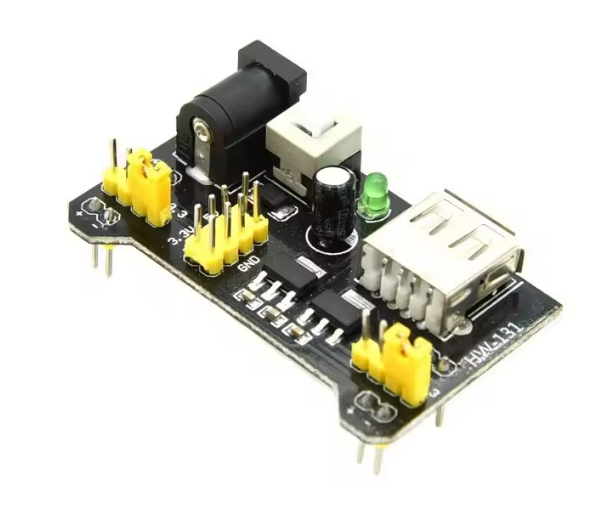
MB102 Breadboard Power Supply Module, 2-Channel 5V/3.3V Regulator Board, Mini USB + DC Barrel Jack Input, Dual Rail Output with Jumpers, On/Off Switch & Power LED, Arduino ESP32 Compatible
The MB102 Breadboard Power Supply Module is a convenient, plug-and-play power solution for solderless breadboard projects. It provides clean, regulated 5V and 3.3V outputs and is designed to fit directly onto standard MB102 / 830-point breadboards, eliminating messy jumper wires and making prototyping faster and safer.
The MB102 Breadboard Power Supply Module is a convenient, plug-and-play power solution for solderless breadboard projects. It provides clean, regulated 5V and 3.3V outputs and is designed to fit directly onto standard MB102 / 830-point breadboards, eliminating messy jumper wires and making prototyping faster and safer.
This module features a two-channel rail design, meaning the left and right breadboard power rails can be set independently. You can run 5V on one rail and 3.3V on the other, or set both sides to the same voltage depending on your circuit needs—perfect for mixed-voltage setups using Arduino, ESP32, sensors, logic modules, displays, and communication boards.
Why you’ll love it
- Quickly powers your entire breadboard with a tidy layout
- Voltage selection is done using simple jumpers (no rewiring)
- Multiple input methods let you use what you already have
- Built-in switch and LED make power control and status easy
Inputs (Power In)
You can power the module in more than one way (depending on version/board):
- Mini USB (5V input): Easy and common for quick setups
- DC barrel jack: Flexible option using external adapters
Tip: If you use a higher DC input voltage, the regulator may heat up more—keep loads reasonable and ensure airflow.
Outputs (Power Out)
The MB102 provides two independent output rails (left and right). Each rail can be set by jumpers to:
- 5V
- 3.3V
- (some versions also support OFF per side depending on jumper position/labeling)
This is extremely useful for powering:
- 5V sensors/modules on one side
- 3.3V modules (ESP32/ESP8266, I2C sensors, RF modules) on the other side
Pin/Module Layout (Typical)
Most MB102 boards include:
- Voltage select jumpers for left and right rails
- ON/OFF slide switch for quick power control
- Power indicator LED
- Breadboard header pins that plug directly into the breadboard rails
- Mini USB port and DC barrel jack inputs
Exact placement/labels can vary slightly by manufacturing batch, but functionality is the same.
Specifications
| Feature | Details |
|---|---|
| Model | MB102 Breadboard Power Supply Module |
| Output Channels | 2 (Left + Right rails) |
| Output Voltage | 5V / 3.3V selectable per rail |
| Input Options | Mini USB 5V, DC barrel jack |
| Recommended Use | Breadboard prototyping, mixed-voltage circuits |
| Compatibility | MB102/830-point and many standard breadboards |
| Indicators | Power LED |
| Control | On/Off switch |
Current handling depends on your input voltage, regulator type, and cooling. For higher-current loads (motors/servos), use a dedicated power supply.
How to Use
- Plug the MB102 module into the breadboard power rail connector area.
- Choose your input (Mini USB or DC jack).
- Set left and right rail voltages using the jumpers (3.3V/5V).
- Switch ON and verify the power LED is lit.
- Connect your modules to the breadboard rails and start prototyping.
Common Applications
- Arduino breadboard projects
- ESP32 / ESP8266 + sensors (3.3V rail)
- Logic level experiments using both 3.3V and 5V
- Powering OLEDs, I2C modules, small sensor boards
- STEM education kits and electronics learning labs
No reviews for this component yet.
Related Components
 In Stock