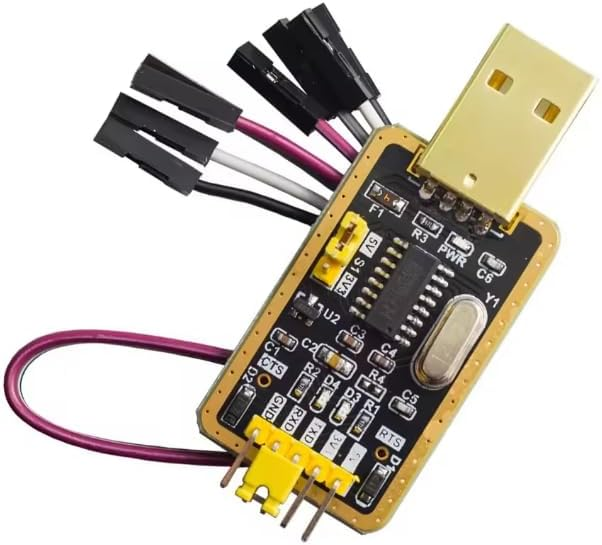
CH340G USB to TTL Serial Adapter Module with 3.3V/5V Select, TX/RX/CTS/RTS Pins, USB-A Plug, UART Converter for Arduino, ESP8266, ESP32, STM32, Raspberry Pi Debugging
Overview This CH340G USB to TTL Serial Adapter Module converts a computer’s USB port into a TTL-level UART interface, enabling direct serial communication with microcontrollers, development boards, and embedded modules.
CH340G USB to TTL Serial Adapter Module
Overview
This CH340G USB to TTL Serial Adapter Module converts a computer’s USB port into a TTL-level UART interface, enabling direct serial communication with microcontrollers, development boards, and embedded modules. It is commonly used for uploading firmware, accessing bootloaders, monitoring serial logs, and providing a stable debug console during development. The module shown features an integrated USB-A plug and a pin header area labeled for common UART signals, making it convenient for quick bench wiring without a separate USB cable.
Technical Details
At the core of the module is the CH340G USB-to-serial controller, which enumerates as a USB serial (COM) device on most operating systems once the appropriate driver is installed. The adapter exposes UART transmit (TXD) and receive (RXD) lines at TTL logic levels, intended for direct connection to the target device’s UART pins (cross-connect TX to RX and RX to TX). Many CH340G adapter revisions also provide hardware flow control pins (CTS/RTS), which can improve reliability in applications where the target device or bootloader expects flow control or where sustained throughput is needed.
A key feature on this style of board is selectable I/O voltage (commonly 3.3V or 5V). The selection is typically implemented by an onboard slide switch or jumper that changes the logic level reference for the UART pins. Because different factories produce slightly different revisions, the exact behavior can vary (for example, some boards switch only the TX/RX logic level, while others also expose a regulated power output). For best results, confirm the silk-screen labels and measure the output with a multimeter before powering sensitive 3.3V devices.
The module is designed for UART signaling (asynchronous serial) and is not a USB-to-RS232 converter; RS232 uses different voltage levels and requires a dedicated transceiver. The board typically includes a crystal oscillator for USB timing and indicator LEDs (often labeled PWR and TX/RX) to show power and serial activity, helping you quickly verify that the adapter is enumerated and data is flowing.
Specifications
- USB interface: USB 2.0 full-speed device (typical for CH340G; check datasheet)
- USB connector: Integrated USB-A male plug (as shown)
- Serial interface: UART (TTL-level), asynchronous
- Logic level selection: 3.3V / 5V selectable (varies by module revision and switch/jumper design)
- Exposed signals (typical): TXD, RXD, GND; may also include VCC, CTS, RTS (confirm silkscreen on your unit)
- Driver support: CH340/CH341 drivers for Windows; native/available support on many Linux distributions; macOS support varies by version (install driver if required)
- Baud rate: Supported baud rates depend on driver/OS and CH340G capabilities; use standard UART rates and verify stability for your application
- Power output: Some revisions provide a VCC pin that can power small targets; available voltage/current and regulation method vary by module revision—do not assume it can power high-load devices
Applications
- Uploading sketches/firmware to Arduino-compatible boards that use UART bootloaders
- Serial console access for ESP8266/ESP32 modules, routers, and embedded Linux boards
- Debug logging for STM32, AVR, PIC, and other MCU UARTs
- Interfacing with GPS modules, Bluetooth UART modules, and other TTL serial peripherals
- Manufacturing test fixtures and field diagnostics where a simple USB-UART bridge is required
Integration Notes
- Wiring: Connect GND-to-GND first. Then connect TXD (adapter) to RX (target) and RXD (adapter) to TX (target).
- Voltage level: Set the adapter to match the target logic level (3.3V for most ESP modules and many sensors; 5V for some Arduino/AVR boards). If unsure, use 3.3V to reduce risk and confirm target tolerance.
- Powering the target: If you use the VCC pin (when present), ensure the target’s current draw is within what the adapter revision can safely supply. For WiFi modules and motors/relays, use a dedicated power supply.
- Auto-reset/boot: Some boards expose RTS/DTR for auto-reset; this pictured revision highlights RTS/CTS. If your flashing workflow needs DTR, verify your specific module’s pinout before purchase/use.
- Driver setup: If the device is not detected, install the correct CH340 driver for your OS and try a different USB port. Use a known-good USB extension if clearance is needed.
Included Components
CH340G USB to TTL Serial Adapter Module
No reviews for this component yet.
Related Components
 In Stock