 Backorder
4×4 Matrix Keypad Module (16-Key) for Arduino, Raspberry Pi & Microcontroller Projects
plus AED 20 delivery · free over AED 100
- UAE-wide delivery, 1–2 working days once dispatched · AED 20 · free on orders AED 100+
- Backorder — ordered in for you, ships when it arrives
- 7-day returns on unopened items
- SKU
- DIY-128
- Category
- Arduino and Raspberry Accessories & Modules
- Min. order
- 1 pc
- Barcode
- DKU-000166
Add a simple, reliable input interface to your electronics project with a 4×4 matrix keypad module (16 keys). This keypad is a popular choice for makers who want fast numeric entry, menu navigation, and basic control input without using a touchscreen or complex user interface.
Read the full description ↓Complete the build
Our own DIYKIT board was made for this — plus what it is usually wired or ordered with.
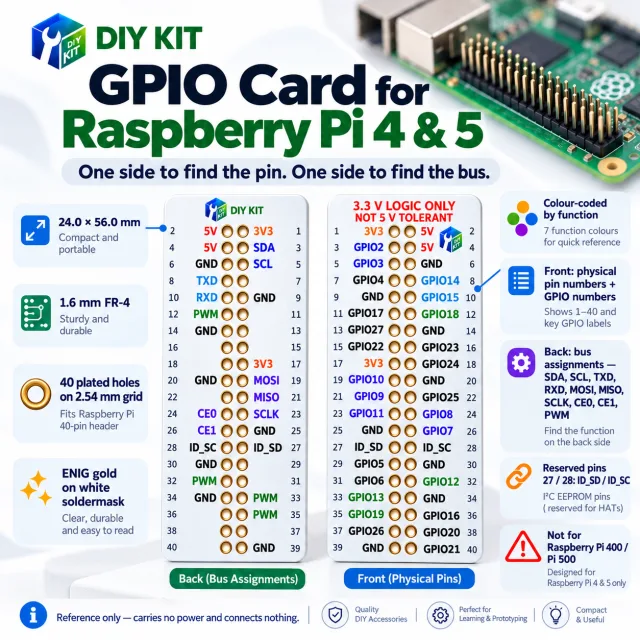
1× 4×4 (16-key) matrix keypad with connector cable
Description
Add a simple, reliable input interface to your electronics project with a 4×4 matrix keypad module (16 keys). This keypad is a popular choice for makers who want fast numeric entry, menu navigation, and basic control input without using a touchscreen or complex user interface. Whether you’re building a DIY access system, a robot controller, a timer, or a small embedded device, a keypad is one of the easiest ways to give users direct control.
Matrix design saves GPIO pins. Instead of dedicating one microcontroller pin per button, the keypad uses a matrix of rows and columns (4 rows + 4 columns). Your controller scans the matrix to determine which key is pressed, allowing you to build compact projects with fewer wires and fewer GPIO connections. This matters when you’re using smaller boards or when your pins are already used for displays, sensors, relays, motors, or communication modules. A 4×4 layout typically needs only 8 I/O pins (4 rows and 4 columns) to read 16 keys, giving you a clean and efficient input solution.
The 4×4 keypad is microcontroller friendly and widely supported by libraries. It works well with Arduino and similar boards, and it’s also suitable for ESP32/ESP8266 projects. On Raspberry Pi, you can read it using GPIO scanning methods in Python or other languages. It also integrates smoothly with AVR, ARM, PIC, and many common embedded platforms. Most projects use a keypad library to handle scanning and debouncing (removing false repeated presses caused by mechanical contact bounce). This helps ensure stable input for passwords, menus, and user commands.
Typical use cases include PIN/password entry for DIY locks and access control, setting values on an LCD/OLED menu, selecting robot modes and movement patterns, entering parameters for sensors or automation rules, and creating simple calculator or counter projects. Because the keypad is lightweight and compact, it is also ideal for educational STEM projects where students learn about matrix scanning, digital inputs, and human–machine interaction.
For best performance, mount the keypad on a stable surface and avoid bending the connector sharply. Route the keypad cable away from high-current motor wires or switching power lines to reduce electrical noise that can cause unreliable readings in some builds. If the keypad is used in dusty or humid environments, consider placing it behind a protective front panel or adding basic sealing around the mounting area to extend its service life.
Included: one 4×4 (16-key) matrix keypad module with connector cable. This is a cost-effective and practical input component for DIY electronics, robotics, and embedded control projects.
Included Components
1× 4×4 (16-key) matrix keypad with connector cable
Specifications
No reviews yet · be the first
Sign in to review a product you have bought - or use the review link in your order email, which needs no account and marks your review as a verified purchase.
Related components
 Backorder
%22%2F%3E%3Cellipse%20cx%3D%2228%22%20cy%3D%2224%22%20rx%3D%2226%22%20ry%3D%2214%22%20fill%3D%22rgba(255%2C255%2C255%2C.18)%22%2F%3E%3Crect%20x%3D%2222%22%20y%3D%2228%22%20width%3D%2256%22%20height%3D%2250%22%20rx%3D%2212%22%20fill%3D%22url(%23b)%22%20filter%3D%22url(%23s)%22%2F%3E%3Cellipse%20cx%3D%2234%22%20cy%3D%2236%22%20rx%3D%2212%22%20ry%3D%226%22%20fill%3D%22rgba(255%2C255%2C255%2C.28)%22%20transform%3D%22rotate(-18%2034%2036)%22%2F%3E%3Crect%20x%3D%2234%22%20y%3D%2215%22%20width%3D%225%22%20height%3D%2214%22%20rx%3D%222.5%22%20fill%3D%22%236ee7b7%22%2F%3E%3Crect%20x%3D%2261%22%20y%3D%2215%22%20width%3D%225%22%20height%3D%2214%22%20rx%3D%222.5%22%20fill%3D%22%236ee7b7%22%2F%3E%3Ccircle%20cx%3D%2236.5%22%20cy%3D%2214%22%20r%3D%224%22%20fill%3D%22%23a7f3d0%22%2F%3E%3Ccircle%20cx%3D%2263.5%22%20cy%3D%2214%22%20r%3D%224%22%20fill%3D%22%23a7f3d0%22%2F%3E%3Crect%20x%3D%2228%22%20y%3D%2242%22%20width%3D%2244%22%20height%3D%2222%22%20rx%3D%226%22%20fill%3D%22%23022c22%22%2F%3E%3Cline%20x1%3D%2228%22%20y1%3D%2250%22%20x2%3D%2272%22%20y2%3D%2250%22%20stroke%3D%22%2334d399%22%20stroke-width%3D%22.8%22%20stroke-opacity%3D%22.5%22%2F%3E%3Cline%20x1%3D%2228%22%20y1%3D%2257%22%20x2%3D%2272%22%20y2%3D%2257%22%20stroke%3D%22%2334d399%22%20stroke-width%3D%22.8%22%20stroke-opacity%3D%22.5%22%2F%3E%3Cline%20x1%3D%2244%22%20y1%3D%2242%22%20x2%3D%2244%22%20y2%3D%2264%22%20stroke%3D%22%2334d399%22%20stroke-width%3D%22.8%22%20stroke-opacity%3D%22.5%22%2F%3E%3Cline%20x1%3D%2256%22%20y1%3D%2242%22%20x2%3D%2256%22%20y2%3D%2264%22%20stroke%3D%22%2334d399%22%20stroke-width%3D%22.8%22%20stroke-opacity%3D%22.5%22%2F%3E%3Ccircle%20cx%3D%2238%22%20cy%3D%2252%22%20r%3D%226%22%20fill%3D%22%2334d399%22%20opacity%3D%22.9%22%2F%3E%3Ccircle%20cx%3D%2262%22%20cy%3D%2252%22%20r%3D%226%22%20fill%3D%22%2334d399%22%20opacity%3D%22.9%22%2F%3E%3Ccircle%20cx%3D%2236.5%22%20cy%3D%2250.5%22%20r%3D%222%22%20fill%3D%22white%22%2F%3E%3Ccircle%20cx%3D%2260.5%22%20cy%3D%2250.5%22%20r%3D%222%22%20fill%3D%22white%22%2F%3E%3Cpath%20d%3D%22M36%2068%20Q50%2076%2064%2068%22%20fill%3D%22none%22%20stroke%3D%22%23022c22%22%20stroke-width%3D%222.5%22%20stroke-linecap%3D%22round%22%2F%3E%3C%2Fsvg%3E)